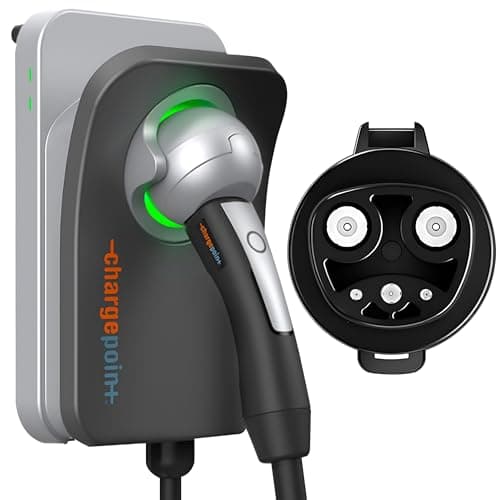
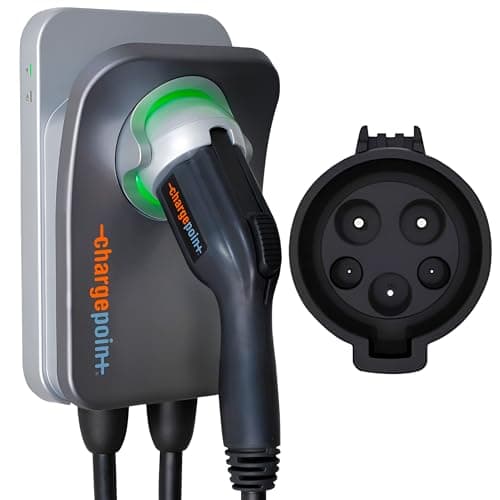
The ChargePoint Home Flex is the choice for buyers who want the established brand and one app for everything. Its amperage adjusts in the app up to 50 amps to match whatever breaker you install, and it plugs into the same ChargePoint account that runs a large share of North America's public charging - so home and away live in one place.
In our best Level 2 chargers roundup the Home Flex earns its place on maturity and support rather than on price. Here is the fuller picture. As with every review here, we compile published specs and do the math instead of bench-testing.
Who it is for
The Home Flex suits the buyer who values a long track record, responsive support, and a single app that follows them from the garage to public chargers on a road trip. If you already use the ChargePoint app to find and pay for public charging, keeping your home charger in the same ecosystem is genuinely convenient. It is not the pick for the shopper whose first priority is price - cheaper chargers match most of what it does.
The specs that matter
ChargePoint makes the Home Flex adjustable up to 50 amps, with a J1772 connector, a NEMA 14-50 plug option, and Energy Star certification. The standout is flexibility:
- Adjustable amperage in the app. You set the output to match the breaker you installed, up to 50 amps, rather than being locked to one rating. That makes it forgiving if your panel can support a smaller circuit today and more later.
- One app for home and public. The Home Flex reports into the same ChargePoint app that maps and pays for a huge public network - a real convenience if that is already how you charge on the road.
Whatever amperage you dial in, the circuit has to back it up: higher output means a bigger breaker and heavier wire under the continuous-load rule, and your car has to accept it. Our amperage guide covers the sizing so you set the app to a number your home can actually support.
What is good
The Home Flex's strengths are the intangibles budget brands cannot fake: a long track record, responsive support, and a polished app tying home charging to the largest public network in the region. The adjustable amperage is genuinely useful for matching a range of circuits, and the experience is smooth and well-documented. If something goes wrong, there is a real company behind it - worth something on a device you rely on daily.
Where it falls short
It costs more than equally capable chargers from newer brands, and the experience leans hard on the ChargePoint account and app. If you do not use ChargePoint's public network, you are paying for an integration that does nothing for you. The core function - delivering Level 2 power - is matched by cheaper units; the premium buys brand maturity and the unified app.
Installation notes
Plug-in or hardwired, size the circuit to whatever amperage you plan to set in the app, and have a licensed electrician confirm your panel can support it. Because the output is adjustable, do not set it higher than the breaker you installed - the app number and the physical circuit have to agree. If you go plug-in, use an industrial-grade, listed NEMA 14-50 outlet rather than a bargain receptacle.
The Home Flex lineup: one charger, three installs, two connectors
ChargePoint does not sell a range of home chargers - it sells one, in configurations. Per ChargePoint's own home-charging page the choices are:
- Home Flex hardwired - the only version that reaches the full 50 amps, which ChargePoint rates at up to about 37 miles of range per hour. This is the configuration to buy if the circuit is going in new anyway.
- Home Flex with a NEMA 14-50 plug - up to 40 amps, about 30 miles per hour. The one to buy when a properly rated 14-50 already exists, or when you might move.
- Home Flex with a NEMA 6-50 plug - also up to 40 amps. The 6-50 is the three-wire welder outlet with no neutral, common in older garages and shops. If that is what is already on your wall, this version saves you a rewire.
Each of those comes with either a J1772 or a NACS connector, and all of them are UL listed and Energy Star certified on a 3-year warranty. So the buying decision is genuinely two questions - which outlet (or none) and which plug on the end of the cable - rather than which model. The other spec worth knowing before you commit: the cable is about 23 feet, a couple of feet shorter than the 25-foot cables on the Emporia and the Wallbox, which is enough to matter at the far corner of a two-car garage.
Bottom line
The ChargePoint Home Flex is the safe, polished choice: adjustable, well-supported, and unified with the biggest public app around. If those things matter, it is worth the premium. If price is your first filter, the Emporiamatches most of what it does for meaningfully less - the ChargePoint's edge is brand and ecosystem, not raw capability.
The Home Flex configurations, side by side
Every figure below is ChargePoint's own published specification, taken from the home charging page and the Home Flex datasheet cited in Sources. We compile and do the arithmetic; we do not bench-test, and we say so.
| Configuration | Amps / kW | Connector | Circuit | Cable | Smart / Wi-Fi | Safety listing |
|---|
| Home Flex hardwired | 16-50A / up to 12 kW | J1772 or NACS | Sized to the setting; 60A for 48A, more for 50A | ~23 ft | Wi-Fi, ChargePoint app, scheduling, public-network account | UL and cUL (UL 2594, UL 2231), Energy Star |
| Home Flex, NEMA 14-50 plug | Up to 40A / 9.6 kW | J1772 or NACS | 50A circuit behind the receptacle | ~23 ft | Same app and features | UL listed, Energy Star |
| Home Flex, NEMA 6-50 plug | Up to 40A / 9.6 kW | J1772 or NACS | 40A or 50A circuit; no neutral needed | ~23 ft | Same app and features | UL listed, Energy Star |
How to pick the right Home Flex
Level 1 versus Level 2
Level 1 is the 120-volt cord that ships with the car - roughly 5 miles of range per hour per the US Department of Energy, which is a plug-in-hybrid answer rather than an EV one. Level 2 is 240 volts and covers about 2.9 to 19.2 kW. Every Home Flex is Level 2. The Home Flex's adjustable output is the useful wrinkle here: you can start it at 16 amps on a modest circuit and raise it later, which is a genuinely different proposition from a fixed-rating charger.
Amps to kW, and why the app number must match the breaker
Amps x 240 volts / 1000 = kW, so 40 amps is 9.6 kW and 48 is 11.5. Because EV charging is a continuous load the circuit is sized to 125 percent of the draw - 50 amps behind a 40-amp setting, 60 behind 48. The Home Flex is the one charger on this site where you can get that wrong in software: never set an amperage in the app that the installed breaker and wire cannot carry. Set it to the circuit, not to the number you wish you had. Our amperage guide has the sizing table.
NACS or J1772
ChargePoint sells every Home Flex configuration with either connector, so buy the one your car has: NACS (SAE J3400) for a Tesla and most 2025-and-later EVs, J1772 for nearly everything older. An adapter bridges either direction, but on the charger you use every night it is one more part to hold in the cold. Our J1772 vs NACS guide covers which cars shipped with which port.
Hardwired or plug-in
Only the hardwired Home Flex reaches 50 amps; both plug-in versions stop at 40, because the receptacle and its circuit set the ceiling. Plug-in buys you portability and a simpler install where an outlet already exists. If you go 14-50, do not pair a premium charger with a bargain receptacle - a continuous 40-amp draw is exactly what makes a cheap one overheat, so use a listed, industrial-grade NEMA 14-50 outlet. And if the existing outlet is a 6-50, buy the 6-50 version rather than adapting it.
Load management and the panel
The Home Flex's selectable output is itself a crude but effective form of load management: if your service cannot spare a 60-amp circuit, dial the charger to 32 or 40 amps and install the circuit it can support. That costs you charge rate, not capability, and for a car that sits for ten hours a night it usually costs nothing real. Where you need automatic throttling against whole-home load, look at the load-balancing chargers instead - and price that against a panel upgrade before assuming the upgrade is required.