HUB 03 · Charging Guides
Why Your EV Charging Keeps Stopping
Charging that begins and then quits partway is almost always one of a short list of causes - a set charge limit, a loose connection, a nuisance trip, or a worn outlet. Work through them in order.
We earn a commission when you buy through our Amazon links, at no extra cost to you. It never affects our rankings, and we say so when the cheaper product is the better buy. How this works.
An EV that starts charging and then stops partway through is frustrating, but the causes are a short, checkable list. Most are simple - a charge limit or a schedule doing exactly what it was told - and the rest point to a connection or electrical issue worth taking seriously. Work through them roughly in this order, from "nothing is wrong" to "call an electrician." If the charger never starts at all, that is a different checklist - see EV charger not charging.
First: is it doing what you told it to?
Before assuming a fault, rule out the intended behavior. Your car may have hit its set charge limit (say 80%) and stopped on purpose - check the target in the car. A departure scheduleor the charger's off-peak timer may have paused charging until a cheaper window, exactly as configured in off-peak scheduling. And some utility or app-based programs pause charging during peak demand. None of these is a malfunction - they are features. Confirm the car reached its limit or a schedule is active before troubleshooting hardware.
Second: the connection
If it is not a schedule, suspect the physical connection. Re-seat the connector fully into the car until it latches; a connector that is not clicked home can drop the session. On a plug-in charger, the NEMA 14-50 outlet is the usual culprit - a worn or loose receptacle makes intermittent contact, which both interrupts charging and makes the plug run hot. That is why an industrial-grade 14-50 matters, and why a hot plug is its own warning sign, covered in EV charger plug getting hot. Check that the plug is fully inserted and not warm to the touch.
Third: trips and faults
If charging stops and you find a tripped breaker or a GFCI fault, the circuit is protecting itself. Occasional nuisance trips can come from moisture or a sensitive GFCI, but repeated trips mean something is wrong and need attention, not repeated resets - walk through them in EV charger tripping breaker and GFCI breakers and EV chargers. The charger's own status lights or fault codes will often tell you which - read them against the manual using fault codes and warning lights.
Fourth: connectivity and firmware
On a smart charger, a dropped Wi-Fi connection or a mid-update firmware hiccup can interrupt a session, though charging usually continues offline on a well-designed unit. If yours pauses when the app disconnects, the fixes are in Wi-Fi not connecting, and a full power-cycle often clears a glitch - see how to reset an EV charger. A reliable unit like the Emporia keeps charging even when the app loses signal, so a Wi-Fi drop should not stop the session.
Repeated breaker or GFCI trips, a warm or discolored outlet, or any burning smell mean you should stop and call a licensed electrician - do not keep resetting. Replacing a worn receptacle, diagnosing a nuisance trip, or checking terminations is standard NEC work for a pro, never a DIY fix. Use this checklist to narrow the cause, then hand any electrical fault to a licensed electrician.
The quick checklist
- Did the car hit its set charge limit? Check the target percentage.
- Is a departure or off-peak schedule pausing it? Check the timer.
- Re-seat the connector until it latches; confirm the plug is fully in.
- Is the outlet warm or loose? Stop and have it inspected.
- Any tripped breaker or GFCI, or a fault code? Read the light, do not just reset.
- Smart charger dropping with Wi-Fi? Check connectivity, then power-cycle.
Most "keeps stopping" cases are the first two - a limit or a schedule. When it is genuinely the outlet or the circuit, treat it as the electrical issue it is and get a pro. When it is the charger itself and the warranty has run out, our ranked Level 2 chargers shows what a replacement costs before you pay for a diagnosis.
The gear
Recommended gear for this guide
The products this guide refers to, with prices pulled live from Amazon and dated on each card.
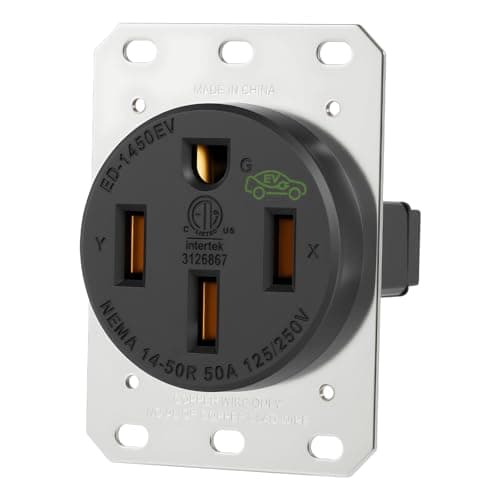
The outlet a plug-in charger needs
Industrial NEMA 14-50 Outlet
The receptacle a plug-in charger actually plugs into — buy the industrial-grade, listed version, because the cheap ones are the exact part that fails.
#ad · As an Amazon Associate we earn from qualifying purchases.
Time to replace it?
If the fix does not hold, here is what we would buy
Most of the time the steps above get a charger working again, and you should give them a fair run first. But when the same fault keeps coming back after you have worked through them, or the unit is out of warranty, it is worth doing the math: replacing a home charger is often cheaper than paying for a service call to diagnose it, and the new one arrives with a fresh warranty. We are not saying yours is broken - only that if it is, these are the Level 2 chargers we would replace it with. All three lead our ranked Level 2 roundup, and every price is pulled live from Amazon.
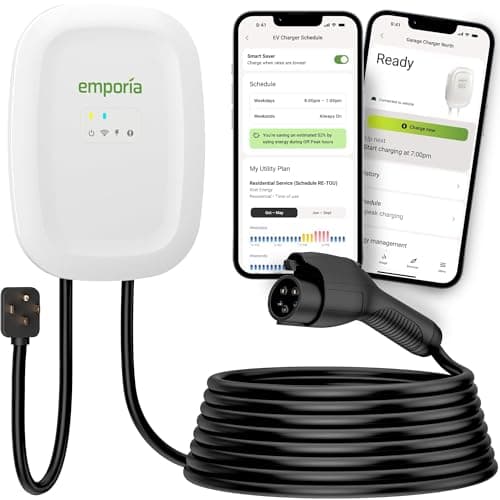
Most homes that want speed and smarts
Emporia Level 2 (48A)
Our top Level 2 pick: 48-amp capable when hardwired, real energy monitoring, priced like a plain plug-in box.
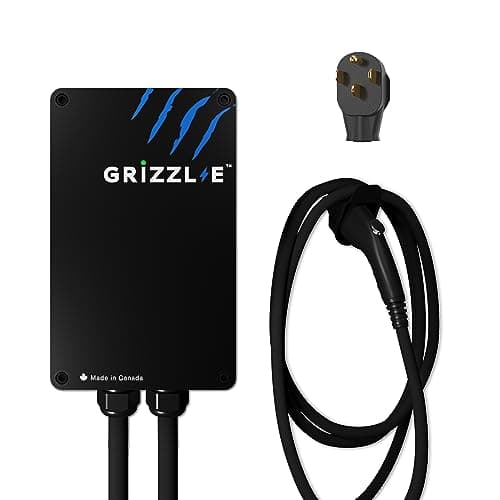
People who want a charger, not an app
Grizzl-E Classic (40A)
The no-app alternative: a UL-certified cast-aluminum box with no Wi-Fi to fail and nothing in the cloud to go dark.
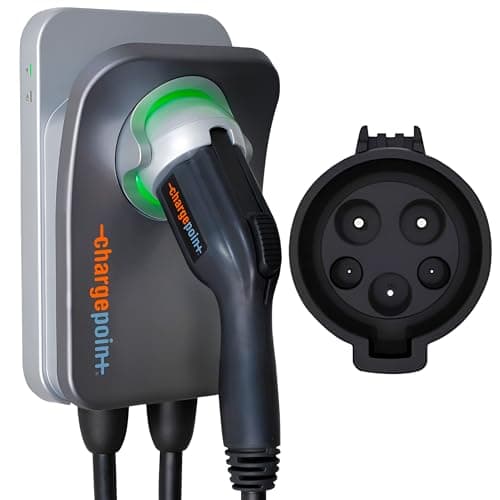
Buyers who want the established brand + one app
ChargePoint Home Flex
The established brand: adjustable up to 50 amps, and one app covers home and public charging.
Full review: Emporia Level 2 →See every Level 2 charger we rank →
#ad · we may earn a commission · As an Amazon Associate we earn from qualifying purchases.
Questions
Frequently asked
Why does my EV stop charging before it is full?
Most often because the car reached its set charge limit (like 80%) or a departure/off-peak schedule paused it - both intended behaviors. Check the charge target and any timers first before assuming a fault.
My charging stops randomly partway - what is wrong?
Suspect the connection: a connector not fully latched, or a worn/loose NEMA 14-50 making intermittent contact (which also heats the plug). Re-seat the connector and check the outlet; a warm plug means stop and have it looked at.
Charging stops and the breaker is tripped - is that normal?
Occasional nuisance trips happen, but repeated trips mean a real problem - do not just keep resetting. See tripping breaker and GFCI breakers, and call an electrician if it persists.
Does losing Wi-Fi stop charging?
On a well-designed smart charger it should not - charging continues offline. If yours pauses when the app disconnects, check connectivity and power-cycle the unit. See Wi-Fi not connecting.
Keep reading
Related
- EV Charger Not ChargingThe checklist for when it never starts at all.
- EV Charger Tripping BreakerWhen the stop is a breaker protecting the circuit.
- EV Charger Plug Getting HotThe worn-outlet cause behind intermittent charging.
- Fault Codes & Warning LightsReading the status light that tells you why it stopped.
- EV Charging Slow at HomeThe related case where it charges but too slowly.
More in this section
More Charging Guides
Receipts
Sources
- EC&M - NEC requirements for EV equipment (Article 625)
- US DOE / fueleconomy.gov - EV charging basics
- US DOE AFDC - charging an EV at home
We do not run a testing lab, and we do not pretend to. Where a measured number came from someone else's lab, we name them and link them. Where we could not verify something, we say so on the page rather than quietly leaving it out. Read our full method.