HUB 02 · Cables & Adapters
Do NACS Adapters Overheat?
Warm is normal physics. Hot is a message. Here is the difference, what causes it, and whether it is safe to leave an adapter on the connector between charges.
We earn a commission when you buy through our Amazon links, at no extra cost to you. It never affects our rankings, and we say so when the cheaper product is the better buy. How this works.
A warm adapter is normal and expected - every electrical contact turns a little power into heat, and an adapter adds a pair of them to the circuit. An adapter that is too hot to hold comfortably after an hour is not normal, and the cause is almost always a poor contact rather than a design flaw. The three things that keep an adapter in the first category: a real certification, a current rating well above what your charger delivers, and clean, dry, fully-seated contacts.
If you are still choosing one, our NACS-to-J1772 adapters and J1772-to-NACS adapters roundups rank the listed options in each direction. This page is the question that comes after the purchase.
Why any adapter gets warm: the physics in one line
Power lost as heat at a contact is the current squared, multiplied by the contact's resistance. The current is squared, which is the whole story: doubling the amps quadruples the heating at every joint. At 40 amps for eight hours - an ordinary overnight Level 2 charge - even a few milliohms of contact resistance produces a steady, noticeable warmth.
An adapter does not change the current. What it changes is the number of joints. A normal connection has one interface: the charger's connector into the car's port. Add an adapter and you have two: charger into adapter, adapter into car. Each one has its own contact resistance, and each one is a place where grit, corrosion or an incomplete insertion can raise that resistance. This is the entire reason adapters attract heat questions, and the same reason the honest advice everywhere on this site is to never stack two adapters.
| What you feel after an hour of charging | What it means | What to do |
|---|---|---|
| Cool to slightly warm | Normal. Low current, or a very good contact | Nothing |
| Clearly warm, comfortable to hold | Normal at 32 to 48 amps. This is expected | Nothing |
| Hot - you would put it down quickly | A contact problem, or current above the adapter's rating | Stop charging. Inspect, clean, reseat. Reduce the charger's amps |
| Too hot to touch, or any smell or discoloration | A failing joint. This is the pre-melt condition | Stop and do not use it again. Replace the adapter |
The four real causes of an adapter running hot
1. It is not fully seated
The most common cause by a distance. A partially-inserted adapter makes contact over a fraction of the designed surface area, which multiplies the resistance at exactly the point carrying 40 amps. Push until it stops and the latch engages, every time. Adapters with a locking pin or a positive latch are easier to get right, which is a genuine safety feature rather than a convenience one.
2. Grit or moisture in the contacts
Adapters live in door pockets and on garage floors. Sand, road salt and grit bed into the contact surfaces and hold the two halves apart; moisture in a contact promotes corrosion, which does the same thing permanently. Keep the adapter capped or docked, and look into it before you plug it in - a holster or dock is the cheapest fix on this page.
3. Current above what the adapter is rated for
Listed home adapters are typically rated far above domestic charging - 60 or 80 amps against a home charger's 40 or 48 - so this is rare at home and much less rare on commercial equipment. Check the rating stamped on the body, and if your charger is adjustable, dialing it down is the correct interim step while you work out why something is warm. Our amperage guide covers how the setting is made.
4. The adapter is not actually a listed product
An uncertified adapter has not been tested for temperature rise, dielectric strength or mechanical endurance. The relevant standards are UL 2251 and UL 2252, which cover plugs, receptacles and couplers for electric vehicles; a mark from a Nationally Recognized Testing Laboratory - UL or Intertek's ETL, which carry the same NRTL status - means somebody measured the temperature rise instead of estimating it. This is the one cause you can rule out at the point of purchase, and the reason our adapter rankings are sorted on certification before price.
Can I leave the adapter on the charger all the time?
You can, and plenty of people do - but it is the kind of "yes" that comes with conditions. Leaving a listed adapter semi-permanently on the charger's connector is electrically fine: the joint is only energized while charging, and the adapter is a passive pass-through the rest of the time. The risks are mechanical and environmental rather than electrical.
- Weight and leverage.An adapter adds length and mass at the end of a heavy cable. Left hanging, that extra moment works on the charger connector's latch and the cable's strain relief.
- Water, if the assembly points upward. An adapter left face-up collects rain and washing water in the contact cavity. Enclosure ratings on adapters frequently differ between the body and the mating surface, so a high IP number does not mean the open end is sealed.
- You lose the portability you paid for. The main advantage of an adapter over a dual-connector charger is that it travels with the car. An adapter permanently on the garage wall cannot help you at a public post.
Our recommendation, which is boring and works: dock the whole assembly - connector plus adapter - in a holster so nothing hangs and nothing faces upward, and if the adapter is the one the car takes on the road, keep it in the car rather than on the wall. In a mixed household, see chargers for a Tesla and a non-Tesla for whether a dual-connector unit removes the question entirely.
DC fast charging is a different conversation
Everything above is about AC charging at home or at a Level 2 post, at currents in the tens of amps. DC fast charging runs at hundreds of amps with liquid-cooled cables and a vehicle-to- station temperature dialogue, and the home AC adapters in our roundups are not rated for it at all - they are AC-only parts and will not work at a DC station. The dedicated DC adapters that exist are vehicle-manufacturer-approved products with their own thermal sensing. See do NACS adapters work at Superchargers for the full picture, and do not reason from this page to that one.
A five-second habit that prevents all of this
On the first long charge after any new adapter, go out an hour in and put your hand on three places: the adapter body, the charger's connector, and - on a plug-in charger - the face of the wall outlet. Warm everywhere is a working system. One component much hotter than the others tells you which joint to look at. If it is the wall outlet rather than the adapter, the problem is the receptacle and our plug getting hot guide is the right page - a tired 14-50 receptacle is a far more common failure in home charging than any adapter.
Repeat the check each season. Nothing in this system degrades quickly, but contacts do degrade, and the hand test catches it long before anything melts.
What to look for in an adapter you will trust overnight
- A UL 2251 or UL 2252 certification from an NRTL.Not "designed to" or "tested to" - a listing you can look up.
- A current rating well above your charger. 60 or 80 amps against a 40- or 48-amp charger is comfortable headroom and runs cooler for it.
- A locking pin or positive latch, which makes a full, correct insertion the default rather than something you have to get right by feel.
- Over-temperature protection, where the maker publishes it. Some adapters list internal thermal switches; where a manufacturer does not publish one, we do not assume it exists.
- An enclosure rating, read carefully. Check whether the rating applies to the mating surface or only to the body.
The three adapters below are the registry picks that satisfy that list, plus the holster that solves the leave-it-attached problem properly.
The gear
Recommended gear for this guide
The products this guide refers to, with prices pulled live from Amazon and dated on each card.
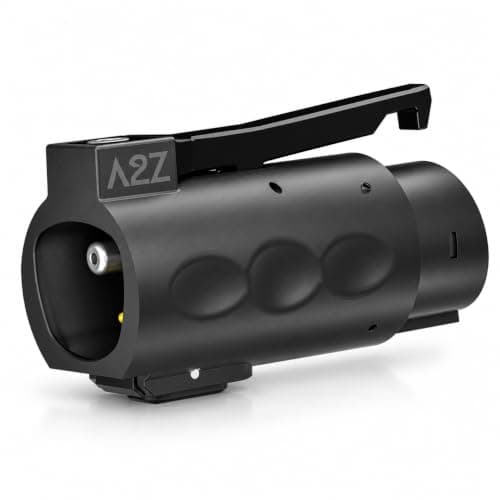
The most certified option
A2Z EV Stellar Plug (NACS to J1772)
The most thoroughly certified NACS-to-J1772 adapter you can buy — UL2252 and CSA certified, dual thermal sensors, IP67 body, and it locks into the port while charging.
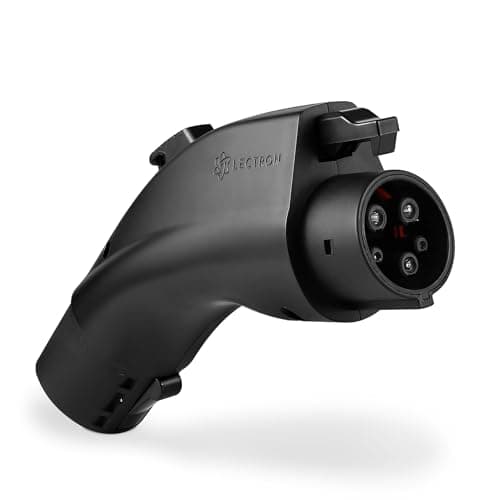
A J1772 car using NACS chargers
Lectron NACS → J1772 Adapter
The default adapter that lets a J1772 car draw from a Tesla-style (NACS) home or destination charger — rated for the full 48 amps.
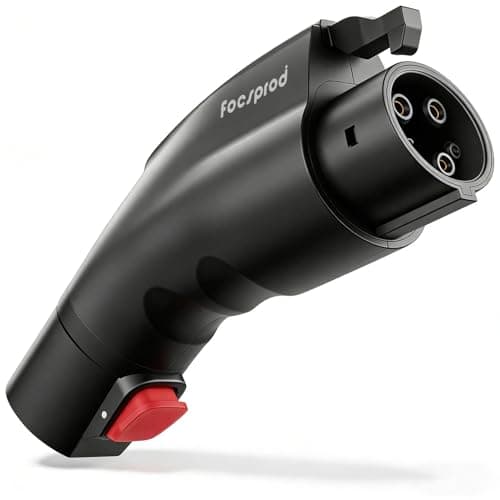
Listed, without the premium
FOCSPROD NACS to J1772 (60A)
A UL 2252 adapter at a mid-market price, rated to 60 amps — more than a home Wall Connector will ever ask of it.
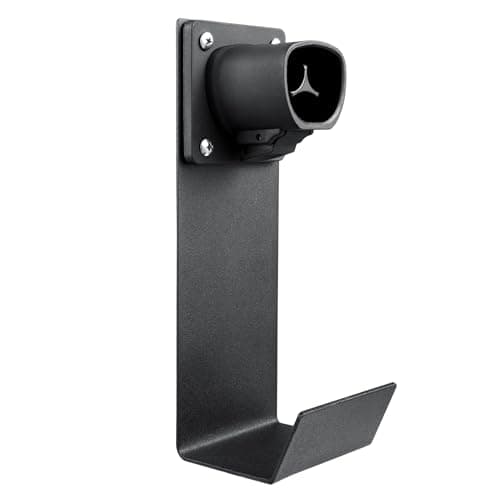
Tesla and NACS connectors
Lectron NACS Holster + J-Hook
The same dock-plus-hook idea cut for the NACS connector — the one accessory a Tesla Wall Connector owner is most likely to actually need.
#ad · As an Amazon Associate we earn from qualifying purchases.
Questions
Frequently asked
Is it normal for a NACS adapter to get warm?
Yes. Heating at a contact is the current squared times the resistance, so at 32 to 48 amps a clearly warm adapter is expected physics, not a fault. The line to watch for is "hot": if you would not hold it comfortably after an hour, stop charging and look at the contacts. Any smell, discoloration or deformation means replace it.
Why is my adapter hotter than the charger connector?
Because it is carrying the same current through a smaller assembly with two contact interfaces instead of one. A modest difference is normal. A large one points at a specific joint - usually an adapter that is not fully seated, or grit in the contacts. Unplug, look into both ends, reseat firmly until the latch engages, and if it persists reduce the charger's amperage and replace the adapter.
Can I leave a NACS adapter attached to my charger permanently?
Electrically yes, with a listed adapter. The practical cautions are mechanical: the added weight works on the connector latch and cable strain relief, an upward-facing assembly collects water, and the adapter can no longer travel with the car. Dock the whole assembly in a holster so nothing hangs or faces up, and keep the road adapter in the vehicle.
Do adapters reduce charging speed or waste electricity?
Not measurably. A listed adapter is a passive pass-through rated well above home charging currents, and the losses at a good contact are a tiny fraction of the power flowing. Your charging rate is set by the circuit, the charger and the car's onboard charger - see how fast will my EV charge.
Can I use two adapters together to make a connection work?
No. Each adapter adds two more contact interfaces, and every interface is a place for resistance and heat to accumulate on a circuit that carries current continuously for hours. If one listed adapter does not solve your problem, the answer is different hardware - a charger with the right connector - not a chain.
Will an adapter work at a DC fast charger if it stays cool at home?
No, and the reasoning does not transfer. The home AC adapters in our roundups are AC-only parts and will not operate at a DC station regardless of temperature; DC fast charging runs at hundreds of amps with cooled cables and station-to-vehicle thermal signalling. See do NACS adapters work at Superchargers.
Keep reading
Related
- Best NACS-to-J1772 adaptersWhich one to buy, ranked on certification and current rating.
- Best J1772-to-NACS adaptersThe other direction, for a Tesla or NACS-port car.
- EV charger plug getting hotThe far more common heat problem: the wall receptacle, not the adapter.
- Do NACS adapters work at Superchargers?Why none of this page's reasoning carries over to DC.
- Best cable holstersThe fix for leaving an adapter attached without hanging or pooling water.
- EV charger maintenance and careThe seasonal check that catches a degrading contact early.
More in this section
More Cables & Adapters
Receipts
Sources
- SAE J1772 specification (the AC coupler, its contacts, the control pilot and proximity detection)
- SAE International - J3400 (the NACS connector standard)
- Intertek - UL 2594 testing and certification for electric vehicle supply equipment
- Intertek - the ETL Listed Mark and OSHA Nationally Recognized Testing Laboratory (NRTL) status
- EC&M - NEC requirements for EV equipment (Article 625: EVSE is a continuous load, circuits sized at 125 percent of the load)
- US DOE AFDC - EV charging infrastructure and connectors
We do not run a testing lab, and we do not pretend to. Where a measured number came from someone else's lab, we name them and link them. Where we could not verify something, we say so on the page rather than quietly leaving it out. Read our full method.