Skip to content
The Charge Curve

HUB 01 · Home EV Chargers

The Best EV Chargers With Scheduling and Time-of-Use Control

On a time-of-use rate, the hours you charge matter more than the charger you bought. These are the units that move charging to the cheap window on their own - including two that do it with no app at all.

By Stephen V.Updated How we compare
#ad

We earn a commission when you buy through our Amazon links, at no extra cost to you. It never affects our rankings, and we say so when the cheaper product is the better buy. How this works.

The short answer

Quick picks

  • Emporia Emporia Level 2 (48A)
    01 Emporia Level 2 (48A)
    9.0

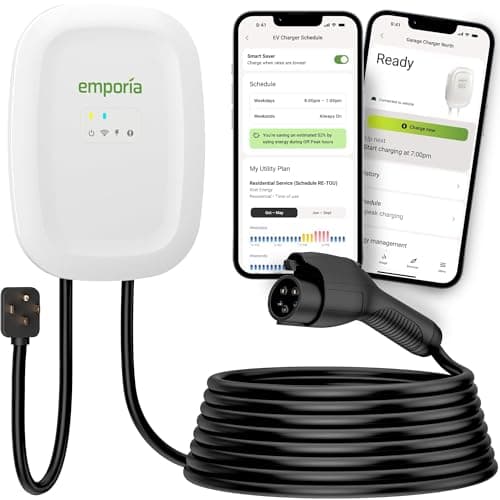
    The charger that refuses to charge you extra for being smart: full 48-amp speed and real energy monitoring at roughly the price of a plain plug-in box.

    Best for: Most homes that want speed and smarts

    $449.00Amazon
  • ChargePoint ChargePoint Home Flex
    02 ChargePoint Home Flex
    8.2

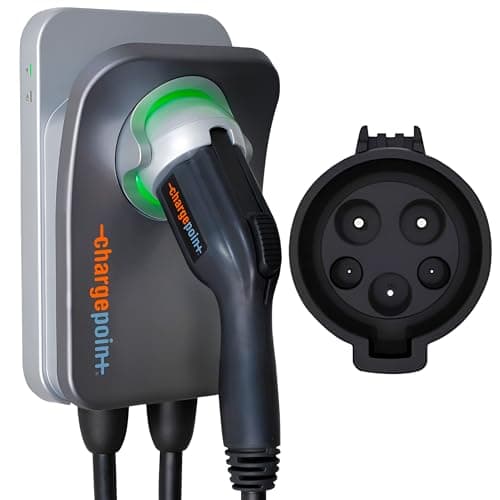
    The mature, well-supported pick — amperage you dial in up to 50A, wired into the biggest public-charging app in North America. You pay for the polish.

    Best for: Buyers who want the established brand + one app

    $599.00Amazon
  • Autel Autel MaxiCharger (40A)
    03 Autel MaxiCharger (40A)
    8.6

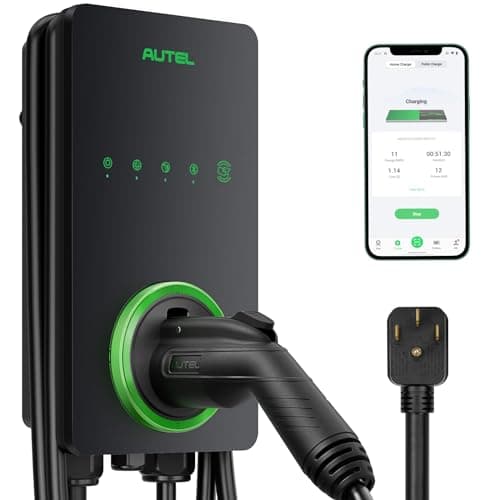
    The everything-in-the-box option: Wi-Fi and Bluetooth both, a weather-rated shell, and a holster included so the install is tidy from day one.

    Best for: Feature-maximalists who want a clean install

    $446.50Amazon
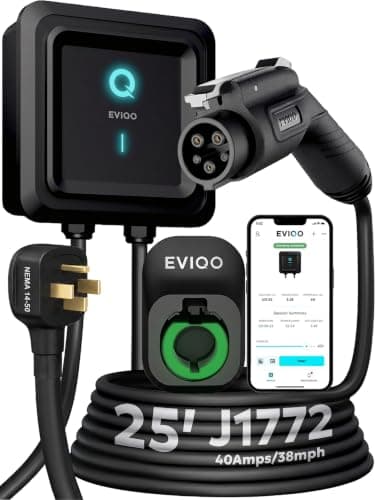
  • EVIQO EVIQO Level 2 (40A)
    04 EVIQO Level 2 (40A)
    8.6

    A double-listed (UL and ETL), IP66-weatherproof smart charger that keeps landing at the bottom of the price band — a lot of certified hardware for the money.

    Best for: Budget buyers who still want smart features

    $429.99Amazon
  • EVDANCE EVDANCE 40A Portable
    05 EVDANCE 40A Portable
    8.2

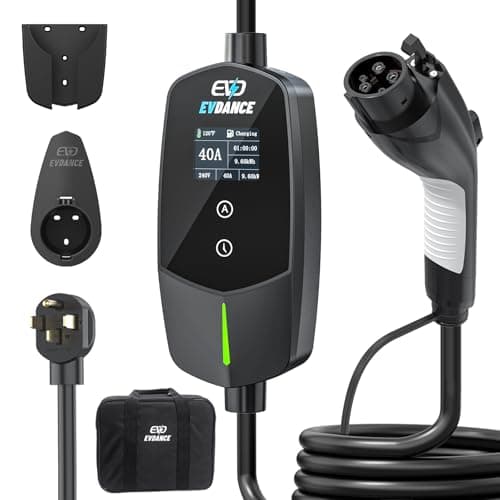
    A 40-amp portable with adjustable current and a built-in delay timer on a long 25-foot cable — off-peak charging without needing an app.

    Best for: Off-peak charging without an app

    $199.98Amazon
  • ELEGRP ELEGRP NACS 40A (14-50)
    06 ELEGRP NACS 40A (14-50)
    7.8

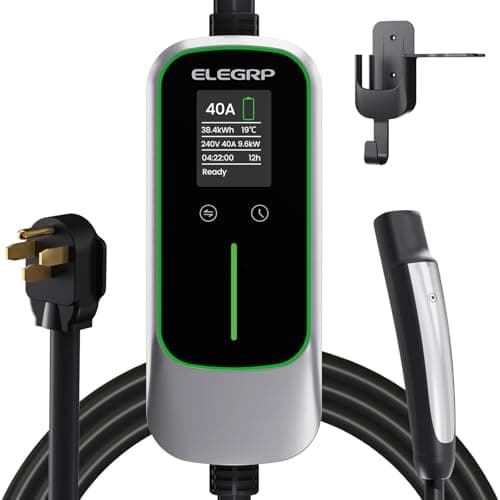
    The budget way into a native NACS plug: 40 amps, a listed safety certification and a 25-foot cable, with the app left out to hit the price.

    Best for: The cheapest certified NACS wall unit

    $249.99Amazon

#ad · Live prices from the Amazon Product API, as of Sep 18, 2026. Where we have no verified live price, we show none — we would rather leave a gap than print a number that has gone stale.

The Emporia Level 2 is the one to buy: it schedules charging in the app and then shows you the kilowatt-hours it moved, which is the only way to know the schedule is actually working. The ChargePoint Home Flex is the pick if you want the charger to look your utility's rate plan up for you. And if you would rather not involve Wi-Fi in this at all, the EVDANCE portable and the ELEGRP NACS both put a delay timer on the box itself - no app, no cloud, nothing to go offline at 2am.

Scheduling is the smart feature most likely to pay for itself, and it is the only one with a number attached. On a time-of-use electricity plan the same kilowatt-hour can cost two or three times more at 6pm than at 1am, and an EV is the largest single load most homes have. Moving it into the cheap window is free money - but only if the move happens every night without you thinking about it, which is what a scheduler is for. The rate side of this is covered in off-peak and time-of-use charging; this page ranks the hardware that acts on it.

Two kinds of scheduling, and they fail differently

The chargers here split into two groups, and the distinction matters more than the brand:

  • App schedules(Emporia, ChargePoint, Autel, EVIQO) are set on your phone and run through the charger's Wi-Fi connection. They can be changed from anywhere, adjusted per weekday, and paired with the charger's own energy reporting so you can confirm the session landed where you wanted. Their failure mode is connectivity: a router reboot, a firmware update or a cloud outage, and the schedule may not fire.
  • On-box delay timers(EVDANCE, ELEGRP) are a button on the unit that says "start in N hours". Cruder - no per-day patterns, no remote changes, and you re-arm it each time - but there is nothing between the timer and the contactor. No Wi-Fi, no account, no server. In a detached garage with bad signal, that is not a downgrade, it is the correct product.

Set the schedule in ONE place.Nearly every EV has its own departure or off-peak charging schedule built into the car, and the single most common reason a home charging schedule "stops working" is that the car and the charger are both trying to run one. The charger waits for the car; the car waits for its own window; you wake up to a car that did not charge. Pick one - we usually suggest the charger, because it is the thing that knows your rate and logs the result - and switch the other one off completely.

The picks

The Emporia Level 2wins on the combination rather than on the scheduler alone. Plenty of chargers can delay a start; Emporia schedules the charge, adjusts current in single-amp steps from 6 to 48, and then reports the kilowatt-hours and cost of what happened - so "did my off-peak schedule run last night?" is a question with an answer instead of a hope. It is also the cheapest full-speed charger we track. Details on the metering side are in our energy-monitoring roundup.

The ChargePoint Home Flex has the most rate-aware scheduler here. The app can connect to your local utility and recommend the cheapest window for your plan, or you can enter your own per-kWh price, and you can run different schedules for weekdays and weekends. If you are on a complicated plan and do not want to become an expert in it, that lookup is genuinely the feature you are buying.

The Autel MaxiCharger schedules from the Autel Charge app and carries Bluetooth alongside Wi-Fi, so control survives the weak garage signal that breaks Wi-Fi-only units - the most under-rated reliability feature in this category. The EVIQO Level 2 is the budget app scheduler: the same core capability, UL and ETL listings, an IP66 shell, at the bottom of the price band.

The EVDANCE 40A portable is the pick for anyone who wants off-peak charging with no account and no network. Its delay timer starts the session hours later, its current is adjustable, and being a portable it goes to a second home or a rental with you. The ELEGRP NACS 40A does the same job for a Tesla-style port - five current settings and a delay timer on the box, no app anywhere - and it is the cheapest native-NACS wall unit we track.

In detail

The picks, in full

01
Emporia Emporia Level 2 (48A)

Most homes that want speed and smarts

Emporia Level 2 (48A)

Up to 48A / 11.5kWJ177225ft cableWi-Fi + app
9.0/10

The charger that refuses to charge you extra for being smart: full 48-amp speed and real energy monitoring at roughly the price of a plain plug-in box.

Charge speed
10
Build & weather
8
Smart features
9
Cable & connector
8
Value
10

Pros

  • 48-amp capable when hardwired — quicker than the 40-amp plug-in default most units top out at
  • Genuine energy tracking and scheduling in the app, priced below almost every other smart charger
  • The 25-foot cable reaches either side of a two-car garage

Cons

  • You only get 48 amps hardwired on a 60-amp circuit; the plug-in version is capped at 40A like everything else
  • The app and Wi-Fi are central to the experience, so first-time setup takes longer than a plug-and-go box

Don't buy this if…

you never intend to open an app. A lot of what you are paying for is the software; if a sealed, silent box is what you actually want, the Grizzl-E Classic is the honest call.

$449.00View on Amazon

Price as of Sep 18, 2026. Prices change — Amazon's is the one that counts.

#ad · we may earn a commission from this link to Emporia Level 2 (48A)

02
ChargePoint ChargePoint Home Flex

Buyers who want the established brand + one app

ChargePoint Home Flex

Adjustable to 50AJ1772NEMA 14-50 plugEnergy Star
8.2/10

The mature, well-supported pick — amperage you dial in up to 50A, wired into the biggest public-charging app in North America. You pay for the polish.

Charge speed
9
Build & weather
8
Smart features
9
Cable & connector
8
Value
7

Pros

  • Output is adjustable in the app up to 50A, so it matches whatever breaker you can install today and more later
  • Reports into the same ChargePoint app that maps and pays for a huge public network — home and away in one place
  • Long track record and responsive support that newer budget brands cannot match

Cons

  • Costs more than equally capable chargers from newer brands
  • The experience leans hard on the ChargePoint account and app; skip it and you are paying for an integration you will not use

Don't buy this if…

price is your first filter. The Emporia matches most of what this does for meaningfully less — here you are paying for brand maturity and the unified app, which are real but not free.

$599.00View on Amazon

$657.999% off

Price as of Sep 18, 2026. Prices change — Amazon's is the one that counts.

#ad · we may earn a commission from this link to ChargePoint Home Flex

03
Autel Autel MaxiCharger (40A)

Feature-maximalists who want a clean install

Autel MaxiCharger (40A)

40A / 9.6kWJ177225ft cable + holsterWi-Fi + Bluetooth
8.6/10

The everything-in-the-box option: Wi-Fi and Bluetooth both, a weather-rated shell, and a holster included so the install is tidy from day one.

Charge speed
8
Build & weather
9
Smart features
9
Cable & connector
9
Value
8

Pros

  • Comes with an in-body holster, so you get proper cable management out of the box instead of buying it later
  • Both Wi-Fi and Bluetooth — app control still works when garage Wi-Fi is weak, which it usually is
  • Weather-rated enclosure for indoor or outdoor mounting

Cons

  • 40-amp ceiling, so it is not the fastest choice if your panel could support a 48A circuit
  • The feature set is more than a set-and-forget overnight charger buyer actually needs

Don't buy this if…

your panel can support a 48-amp circuit and raw speed is the goal. The 48A Emporia or Wallbox adds range faster; the Autel's edge is breadth and the in-box holster, not top speed.

$446.50View on Amazon

$470.005% off

Price as of Sep 18, 2026. Prices change — Amazon's is the one that counts.

#ad · we may earn a commission from this link to Autel MaxiCharger (40A)

04
EVIQO EVIQO Level 2 (40A)

Budget buyers who still want smart features

EVIQO Level 2 (40A)

40A / 9.6kWJ177225ft cableUL & ETL, IP66/NEMA 4
8.6/10

A double-listed (UL and ETL), IP66-weatherproof smart charger that keeps landing at the bottom of the price band — a lot of certified hardware for the money.

Charge speed
8
Build & weather
9
Smart features
8
Cable & connector
8
Value
10

Pros

  • Carries both UL and ETL listings plus an IP66 / NEMA 4 weatherproof rating — unusually well-certified for the price
  • Wi-Fi app with scheduling that undercuts the established brands
  • Long 25-foot cable and a simple plug-in NEMA 14-50 install

Cons

  • Newer brand with a shorter track record than ChargePoint or Wallbox
  • 40-amp ceiling, so not the fastest if your panel could do more

Don't buy this if…

the reassurance of a long-established brand and support network matters most to you. The hardware is well-listed, but if brand maturity is what you are buying, the ChargePoint is the safer pick.

$429.99View on Amazon

$469.999% off

Price as of Sep 18, 2026. Prices change — Amazon's is the one that counts.

#ad · we may earn a commission from this link to EVIQO Level 2 (40A)

05
EVDANCE EVDANCE 40A Portable

Off-peak charging without an app

EVDANCE 40A Portable

40A / 9.6kWJ1772NEMA 14-50 plug25ft, timer
8.2/10

A 40-amp portable with adjustable current and a built-in delay timer on a long 25-foot cable — off-peak charging without needing an app.

Charge speed
8
Portability
9
Build & weather
7
Cable & connector
8
Value
9

Pros

  • A delay timer lets you start on cheaper overnight rates with no app or smart wiring
  • Adjustable current adapts it to different circuits
  • Long 25-foot cable

Cons

  • No smart-app monitoring — the timer is the whole of the scheduling
  • Value brand with a shorter track record

Don't buy this if…

you want full energy monitoring and remote control. This is a capable manual charger; for app-based tracking a wall unit like the Emporia is the one to buy.

$199.98View on Amazon

Price as of Sep 18, 2026. Prices change — Amazon's is the one that counts.

#ad · we may earn a commission from this link to EVDANCE 40A Portable

06
ELEGRP ELEGRP NACS 40A (14-50)

The cheapest certified NACS wall unit

ELEGRP NACS 40A (14-50)

40A / 9.6kWNative NACS (J3400)NEMA 14-50 plug, 25ftETL listed, IP67
7.8/10

The budget way into a native NACS plug: 40 amps, a listed safety certification and a 25-foot cable, with the app left out to hit the price.

Charge speed
8
Build & weather
8
Smart features
4
Cable & connector
9
Value
10

Pros

  • By far the cheapest native-NACS wall charger here, and its listing still claims ETL and UL certification that the no-name Tesla-plug boxes do not
  • Five selectable current settings and a delay timer put off-peak charging on the box itself, with no app or Wi-Fi to set up
  • 25-foot cable, an IP67 rating, and temperature, surge and leakage protection per the listing

Cons

  • No app, no Wi-Fi and no energy monitoring - scheduling means pressing buttons on the control box
  • A newer brand with a thin track record next to ChargePoint or Emporia, and the certification claim is the listing's own

Don't buy this if…

you want energy tracking, remote start/stop or utility-rate automation. This is a manual charger; the Emporia or the EVIQO buy you the software.

$249.99View on Amazon

Price as of Sep 18, 2026. Prices change — Amazon's is the one that counts.

#ad · we may earn a commission from this link to ELEGRP NACS 40A (14-50)

How the six compare

ChargerAmps / kWPlug typeCableSchedulingSafety listingPrice tier
Emporia Level 26-48A / up to 11.5 kWNEMA 14-50 or hardwired25 ftWi-Fi app schedule + energy reporting to verify itUL listed, Energy StarValue
ChargePoint Home Flex16-50A / up to 12.0 kWNEMA 14-50 or hardwired23 ftWi-Fi app, utility rate-plan lookup, weekday/weekend schedulesUL / cUL (UL 2594, UL 2231), Energy StarPremium
Autel MaxiCharger40A / 9.6 kWNEMA 14-50 plug25 ft + holsterWi-Fi + Bluetooth app schedule (control survives weak Wi-Fi)NEMA 4X weather-rated shell; no UL mark named in our spec setMid
EVIQO Level 26-40A / 9.6 kWNEMA 14-50 plug25 ftWi-Fi app scheduleUL and ETL, IP66 / NEMA 4Budget
EVDANCE 40A portable10-40A / 9.6 kWNEMA 14-50 plug (portable)25 ftOn-box delay timer - no app, no Wi-FiOutdoor-rated, per listingBudget
ELEGRP NACS 40A40A / 9.6 kWNEMA 14-50 plug (NACS connector)25 ftOn-box delay timer + five current settings - no appETL listed, IP67Budget

Scheduling behaviour above is as documented by each manufacturer. We read the apps' own documentation and the live listings; we did not run a multi-week reliability trial, and our methodology says exactly what we do and do not do.

The buyer's guide

1. Check that you are actually on a time-of-use rate

This is the step people skip. On a flat rate, a scheduler saves you nothing - midnight electricity and 6pm electricity cost the same, and the money you spent on the smart charger is gone. Look at your bill for separate peak / off-peak / super-off-peak prices, or a plan name with "TOU" in it. Many utilities also offer an optional EV rate that is worth opting into before you buy any hardware. Start at off-peak and time-of-use charging and check the numbers against cost by state.

2. Amps to kW, so you know how long the window needs to be

Volts times amps over 1,000: at 240 volts, 32A is 7.7 kW, 40A is 9.6 kW and 48A is 11.5 kW. Now divide the energy you need by that. A 60 kWh top-up at 9.6 kW takes a bit over six hours - so a five-hour super-off-peak window will not finish it, and you either need more amps or a schedule that accepts spilling into the shoulder rate. This is the one case where paying for 48 amps has an obvious payback: a narrower cheap window needs a faster charger. The arithmetic is in what kW means, and the fastest units are ranked in fastest home chargers.

3. Level 1 vs Level 2 changes the scheduling question

A Level 1 cord on a 120-volt outlet delivers 1.4-1.9 kW and roughly 3-5 miles of range per hour. It often needs the entire night, which means there is no cheap window to move it into - scheduling only helps if the charge fits inside the window. Level 2 at 240 volts is what makes off-peak charging possible in the first place. See Level 1 vs Level 2.

4. NACS vs J1772, hardwired vs plug-in

Neither affects scheduling. The connector is a shape - match it to your car's port (how to check) - and the install choice is about speed and permanence, since a NEMA 14-50 plug caps a charger at 40 amps / 9.6 kW while a hardwire unlocks 48. That is the only reason four of the six units here stop at 9.6 kW. See hardwired vs plug-in.

5. Load management: scheduling's bigger sibling

A schedule moves charging in time. Load management moves it in power - throttling the charger in real time when the dryer and the oven are both running, so a full-speed unit can live on a panel that could not otherwise carry it. If your constraint is the panel rather than the rate, that is the feature to shop for: chargers with load balancing.

6. Do not schedule everything to start at exactly the hour

Utilities set off-peak windows precisely because they want load moved there - and if every EV on the street starts at 00:00 sharp, the neighbourhood transformer sees a cliff instead of a ramp. Offsetting your start by a random ten or twenty minutes costs you nothing and is quietly the right thing to do. Several apps will stagger it for you if you let them.

So, which one?

Emporia Level 2 for most homes: schedule it, then check it actually ran. ChargePoint Home Flex if your rate plan is complicated and you want the app to work it out. Autel MaxiCharger if garage Wi-Fi is unreliable and a Bluetooth fallback is worth more than the last kilowatt. EVIQO Level 2 for app scheduling on a budget with a full set of safety listings. EVDANCE 40A portable or the ELEGRP NACS 40A if you want off-peak charging with no network, no account and nothing to update - the second of those if your car has a Tesla-style port.
How we picked

We do not run a testing lab

We compiled published specifications from manufacturer manuals and spec sheets, verified the safety listings (UL / ETL), computed the real running and installation costs, checked the wiring math against the NEC continuous-load rule, and read aggregated owner reviews — then scored each product against a published rubric. The scores are judgments from documented research — they are not bench measurements, because we do not have a test lab and we are not going to pretend we do. Every spec and cost figure is cited in Sources.

Questions

Frequently asked

Do I need a smart charger to charge off-peak?

No. Three routes work: a Wi-Fi charger with an app schedule, a charger with an on-box delay timer and no network at all, or the car's own departure/charge schedule, which nearly every EV has. Use exactly one of them. The advantage of doing it at the charger is that the charger also knows your electricity rate and can report what the session cost.

Why did my scheduled charge not start?

The most common cause is two schedules fighting - one set in the car and one in the charger app, each waiting for the other. Turn one off entirely. After that, the usual suspects are a dropped Wi-Fi connection, a charge limit already reached, or a charger left in a paused state. Our charging keeps stopping and Wi-Fi not connecting guides walk the rest.

How much does off-peak charging actually save?

It depends entirely on the spread between your peak and off-peak prices, which is why the honest answer starts with your own bill. Multiply your monthly charging kilowatt-hours by the difference between the two rates - that product is the whole saving. On a plan with a wide spread it is one of the largest recurring savings available to an EV owner; on a flat rate it is exactly zero. Work it through with what it costs to charge per month.

Should I schedule charging in the car or in the charger?

One or the other, never both. The charger is usually the better place: it knows your rate, it logs what happened, and the setting survives you changing cars. The car is the better place if you park at several locations with different rates, or if the charger has no scheduler. Whichever you pick, switch the other one off completely.

Can a charger with no app do time-of-use charging?

Yes. A delay timer on the box - press "start in 4 hours", plug in, walk away - puts the session in the cheap window with no Wi-Fi, no account and nothing to go offline. The EVDANCE portable and the ELEGRP NACS both do this. The trade is that you re-arm it manually and get no per-day patterns or remote control.

Does scheduling charging hurt the battery?

No, and it can help. Batteries prefer not to sit at a high state of charge for long periods, so a schedule that finishes shortly before you leave is gentler than one that fills the pack at 8pm and holds it there overnight. That is separate from the charge limit itself - see should you charge to 100 percent.

Keep reading

More in this section

More Home EV Chargers

All home ev chargers

Receipts

Sources

We do not run a testing lab, and we do not pretend to. Where a measured number came from someone else's lab, we name them and link them. Where we could not verify something, we say so on the page rather than quietly leaving it out. Read our full method.